Solving an Immich E-Mail SMTP Configuration Error
 (image from github)
TLDR: A docker network configuration problem caused an opaque settings error in Immich.
Web search did not surface a clear solution for this error message. The error message is vague, and ripe for a wild goose chase. Maybe this post will help somebody.
The Configuration Problem
I am evaluating Immich as an alternative to cloud photo storage. The Enshitification of apple products and services continues. I'd like to stop paying apple to rent my own phone photo library back to me evey month. I'm not sold Immich will be the answer to that, my first impression: self hosting Immich will be high maintenance.
Immich supports notifications via SMTP. Mailgun is a great, free way to get an SMTP server for your own domain name.
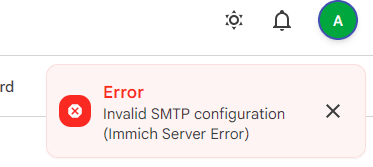
When trying to save settings, I saw the vague UI error:
Invalid SMTP Configuration (Immich server error)
The SMTP configuration I'm providing is known good. I use it successfully many ways. So this Immich error of the Vague & Inacurate variety. Great. Then why would Immich assert this inacurate error?
The server logs were not any help, even with debug trace logs enabled. The log line for this error:
# docker compose logs -f
immich-1 | [Nest] 29 - 07/31/2026, 11:10:38 AM DEBUG [Api:GlobalExceptionFilter~ctuorfil] HttpException(400): {"message":"Failed to verify SMTP configuration","statusCode":400}
What does "Failed to verify" mean? Failed to connect? Incorrect credentails? SSL error? SMTP communication error? Vague errors waste so much time.
Quickly considering possible causes:
- Invalid or missing config values. Such as Invalid IP or Domain Name or Invalid value for port number. We're not having this kind of issue, but checking for whitespace in the form fields is always a good idea anyway.
- Some variety of SMTP configuration fails with Immich's SMTP implemntation. A better error message would be Handshake error with SMTP server for that case. Many hobbiest homelab apps have this problem, like they try to initiate STARTTLS over port 25 or something, and a lot of fiddling is required to find the magic combination of what actually works for this software.
- Authentication error. Connection is successful, but server doesn't accept the credentials. A better error message would be Authentication error: user/pass not accepted
- Failed to reach port 25/487/525 on the target domain. A better error message would be Connection to remote server failed/refused.
- Failed to resolve IP for domain. A better error message would be Could not resolve hostname smtp.yourmailservername.org or something.
Troubleshooting
A quick kagi search found many github issues with people reporting this problem, the Immich devs closing the issue with little comment, and users proposing dozens of wild goose chase solutions. DNS came up in these discussions frequently though. The error message doesn't specify a dns/connectivity problem. But it doesn't give any insight into the nature of the problem at all. This badly composed user facing error message resulted in hundreds of forum posts and issue tickets where newbies chase their tails down the wrong rabbit holes. There's a lesson there. Maybe the immich team has tried to address this with docs or a faq, but if they have, I didn't stumble across it.
It's simple to prove the immich container has a dns problem.
# Get the docker container ID
docker container ls | grep -i immich

# Curl gives clear network errors, and is installed in that container
docker exec -it $CONTIANER_ID curl -v https://api.github.com

# * Could not resolve host: api.github.com
# * shutting down connection #0
The Cause
We've confirmed DNS resolution is broken in the container. Why?
I configured all immich containers to be local network only. It's redis and postgres containers, for example, don't need to be exposed to any connections outside the immich app. Only the web port of the immich web app needs to be accessible. That should affect ingress traffic, not egress traffic. Doesn't explain DNS issues. Or... does it.
I use this approach for all my homelab docker stacks. The container Immich is built on fails to have DNS resolution in this configuration. Most app containers don't have this problem, but it's not unique to Immich.
networks:
  # Exposed to the local LAN connections, via nginx-proxy-manager (SSL, etc)
  proxy:
  # Not exposed to the local LAN connections
  immich:
    external: false
Two Possible Solutions
Override docker's internal DNS proxy address (127.0.0.11 usually?) with a real dns server
DNS settings in the compose file
# docker-compoase.yaml
services:
  immich:
    image: ghcr.io/immich-app/immich-server:v3
    [...]
    dns:
      1.1.1.1
DNS settings for all containers in the docker configuration
# /etc/docker/daemon.json
{
  "dns": ["1.1.1.1"]
}
For Reference
The correct mailgun settings for Immich
For reference. These settings are found at > Admin Settings > Notification Settings > Email
| field | value |
|---|---|
| Host: | smtp.mailgun.org |
| Port | 465 |
| Username | $MAILGUN_SMTP_USERNAME |
| Password | $MAILGUN_SMTP_PASSWORD |
| SMTPS | On |
| Ignore cert errors | Off |
A full docker compose example producing the issue
Here is a simplified example docker compose file that breaks DNS resolution in the immich container. At least, under the current builds of docker, and the current container for immich.
- Uses a internal
immichnetwork for communication between app, pg and redis containers - Uses nginx-proxy-manager as the front end proxy on an internal
proxynetwork. Handles SSL with letsencrypt, and makes the immich app available on a real domain name to the local LAN only.
# This compose file has the problem where the immich container
# fails DNS resolution for it's update checks and SMTP configuration
services:
  proxy:
    image: 'jc21/nginx-proxy-manager:2'
    restart: unless-stopped
    environment:
      TZ: "America/Chicago"
    ports:
      - '80:80'
      - '81:81'
      - '443:443'
    volumes:
      - './data/proxy-data:/data'
      - './data/proxy-letsencrypt:/etc/letsencrypt'
    networks:
      - proxy
      - immich

  immich:
    image: ghcr.io/immich-app/immich-server:v3
    restart: unless-stopped
    env_file:
      - immich.env
    environment:
      DB_HOSTNAME: immich-pg
      REDIS_HOSTNAME: immich-redis
    volumes:
      - ./data/immich:/data
      - /etc/localtime:/etc/localtime:ro
    expose:
      - 2283
    depends_on:
      - immich-pg
      - immich-redis
    networks:
      - immich
      - proxy

  immich-redis:
    image: docker.io/valkey/valkey:9@sha256:4963247afc4cd33c7d3b2d2816b9f7f8eeebab148d29056c2ca4d7cbc966f2d9
    healthcheck:
      test: redis-cli ping || exit 1
    restart: always
    networks:
      - immich

  immich-pg:
    image:  ghcr.io/immich-app/postgres:14-vectorchord0.4.3-pgvectors0.2.0@sha256:bcf63357191b76a916ae5eb93464d65c07511da41e3bf7a8416db519b40b1c23
    env_file:
      - immich.env
    volumes:
      - ./data/immich-pg:/var/lib/postgresql/data
    restart: always
    shm_size: 128mb
    healthcheck:
      disable: false
    networks:
      - immich

networks:
  proxy:
  immich:
    external: false
This compose example has the DNS problem. Set the dns option in the compose file to solve.
See also
- Immich project website and Github
- A few of many github issues citing this vague error message, each with different problems and solutions, or just closed without resolution: #9475, #15153, #22832, #26470, #27274
- Immich SMTP docs